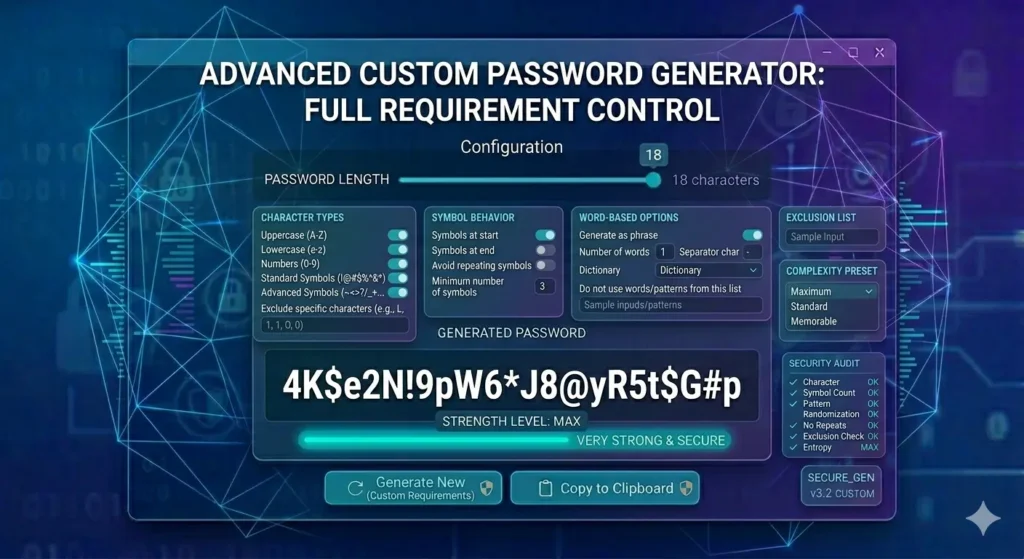
Try a Strong Password Generator
A Password Generator With Requirements helps users create passwords that follow specific security rules. Unlike a basic password generator, this type of tool allows you to customize password length, symbols, numbers, uppercase letters, and other settings.
As a result, you can generate passwords that meet website requirements while maintaining strong security. If you need a flexible Password Creation Tool, a custom password generator can save time and improve protection.
What Is a Password Generator With Requirements?
A Password Generator With Requirements is a custom password generator that creates passwords according to rules chosen by the user.
For example, you may require:
- At least one uppercase letter
- At least one number
- At least one symbol
- No repeating characters
- A specific password length
Therefore, this type of password creator is useful when websites enforce strict password policies.
Unlike a simple random password generator, a custom password generator gives users more control over the final result.
Why Password Requirements Matter
Many websites require specific password rules because weak passwords remain one of the most common security problems.
Furthermore, password requirements help reduce:
- Password reuse
- Easy-to-guess passwords
- Credential stuffing attacks
- Automated login attempts
As a result, users are encouraged to create stronger and more secure passwords.
Consequently, password requirements have become common across banking, email, hosting, and business platforms.
Common Password Requirements
Most websites use some combination of the following rules.
Minimum Password Length
Length is one of the most important password security factors.
Many websites require:
- 8 characters
- 10 characters
- 12 characters
- 16 characters
However, longer passwords generally provide better protection.
Uppercase and Lowercase Letters
Many systems require both uppercase and lowercase letters.
For example:
SecurePassword2026
is generally stronger than:
securepassword2026
Therefore, mixing character types improves password complexity.
Numbers
Numbers add additional combinations.
Examples include:
- Password2026
- Login4589
- Account7742
Consequently, numbers help strengthen passwords without making them difficult to use.
Special Characters
Many websites require symbols such as:
- !
- @
- $
- %
- &
As a result, symbols often increase password strength and improve resistance against guessing attacks.
Password Generator With Requirements vs Random Password Generator
A Password Generator With Requirements focuses on customization.
Meanwhile, a random password generator focuses entirely on randomness.
Both options can be secure. However, custom password generators are often more practical because they help satisfy website-specific rules.
For additional security recommendations, read our Password Security Guide.
Password Generator With Requirements for Different Accounts
Different account types often require different password strategies.
Email Accounts
Email accounts should use:
- Long passwords
- Unique passwords
- Numbers
- Symbols
Furthermore, email accounts often protect access to many other services.
Banking Accounts
Banking websites usually require stronger passwords.
Therefore, many users prefer long passwords with symbols and numbers.
Hosting and WordPress Accounts
Hosting accounts and WordPress administrator accounts often contain sensitive information.
Consequently, weak passwords can create significant security risks.
For high-security accounts, many users choose password settings similar to those found in our 18-Character Security Guide.
Should You Exclude Similar Characters?
Some password generators allow users to exclude characters such as:
- O and 0
- l and I
- S and 5
As a result, passwords become easier to read and type correctly.
Nevertheless, removing characters slightly reduces the number of possible combinations.
Therefore, users should balance readability and security according to their needs.
Creating Unique Passwords
A strong password should always be unique.
Unfortunately, many users still reuse passwords across multiple websites.
However, password reuse creates unnecessary security risks.
If attackers obtain one password, they often attempt to use it elsewhere.
As a result, one leaked password can expose multiple accounts.
Therefore, every account should have a unique password.
Avoid Personal Information
Strong passwords should never contain:
- Names
- Birthdays
- Usernames
- Pet names
- Phone numbers
Although personal information may be easier to remember, it also makes passwords easier to guess.
If you currently use personal information in passwords, review our Personal Password Risks Guide.
Password Managers and Custom Passwords
Password managers make it easier to store custom passwords securely.
In addition, they help prevent password reuse across multiple websites.
Furthermore, they allow users to manage dozens of strong passwords without memorizing each one.
As a result, many security experts recommend combining a password manager with an Online Password Generator.
Frequently Asked Questions
What is a Password Generator With Requirements?
It is a tool that creates passwords according to specific rules such as password length, symbols, numbers, and uppercase letters.
Are custom passwords secure?
Yes. Custom passwords can be highly secure when they are long, random, and unique.
Why do websites require symbols?
Symbols increase password complexity and make passwords more difficult to guess.
Can I create passwords without symbols?
Yes. However, symbols generally improve password strength when supported.
Should every account have a unique password?
Yes. Unique passwords provide significantly better security than reused passwords.
Final Thoughts
A Password Generator With Requirements gives users complete control over password creation. Moreover, it helps satisfy website security policies while maintaining strong protection.
Ultimately, custom password generation improves both security and flexibility for modern online accounts.
If you need a flexible Password Creation Tool, start generating custom passwords today. Additionally, explore our Password Security Guide and 18-Character Security Guide.