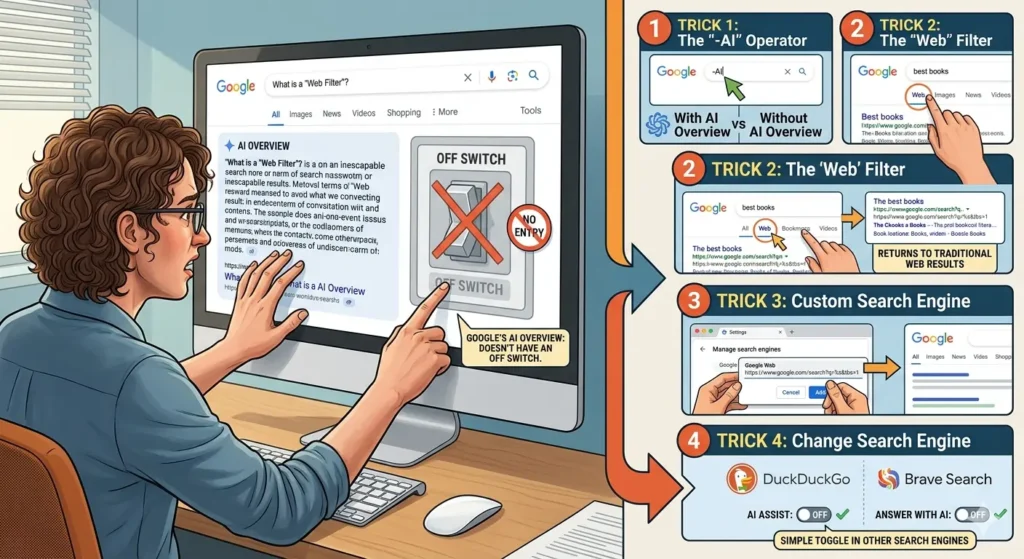
Trying to disable Google AI Overview has become surprisingly frustrating.
Meanwhile, Google keeps pushing AI-generated summaries deeper into:
- Search
- Chrome
- Android
- Gemini
- Workspace products
However, many users simply want:
- traditional search results
- cleaner pages
- fewer AI summaries
- direct website links
instead of generated answers.
Consequently, people keep searching for a simple “turn off AI Overview” button.
And honestly, Google still does not really provide one.
Additionally, many users searching how to disable Google AI Overview say they simply want:
- cleaner search pages
- direct website links
- fewer AI summaries
- classic Google-style results
Consequently, frustration around AI-powered search continues growing rapidly online.
That growing frustration also connects directly to:
- Searching “Disregard” Completely Breaks Google’s AI Overview
- Google’s AI Can’t Spell Google (or Anything Else)
- Google’s AI Search Is Driving Users Straight to Privacy-First Engines
- 6 Search Engines That Don’t Force-Feed You AI (DuckDuckGo Leads the Pack)
Why Users Want to Disable Google AI Overview
Initially, AI Overviews sounded useful.
Meanwhile, Google promised:
- faster answers
- summarized information
- conversational search
- AI-powered assistance
directly inside Search.
However, many users increasingly complain about:
- hallucinations
- incorrect summaries
- cluttered results
- unreliable information
- unnecessary AI responses
Consequently, some people now actively avoid AI-powered search entirely.
Additionally, AI summaries sometimes push real websites lower on the page.
Because of that, users increasingly want cleaner traditional search results back.
Disable Google AI Overview With the “Web” Filter
Importantly, the easiest workaround is using Google’s hidden “Web” filter.
Meanwhile, this filter removes:
- AI Overviews
- featured snippets
- extra search modules
in many searches.
To use it:
- Search normally on Google
- Click “Web” under the filter tabs
- If you do not see it, click “More”
Consequently, Google shows mostly traditional blue-link search results instead of AI-generated summaries.
Additionally, many users say this immediately makes Google feel cleaner again.
Because of that, the “Web” filter became one of the most popular anti-AI search tricks online.
Trick 2: Add “-ai” or Extra Keywords
Interestingly, some users reduce AI Overviews by changing search phrasing slightly.
Meanwhile, searches that look:
- highly specific
- technical
- direct
- keyword-heavy
sometimes avoid triggering AI summaries entirely.
Additionally, adding:
- “forum”
- “Reddit”
- “manual”
- “PDF”
- “discussion”
can occasionally bypass AI-generated responses too.
Because of that, experienced users increasingly modify searches intentionally to avoid AI-heavy pages.
Why Users Disable Google AI Overview Using Other Search Engines
Honestly, this is the solution many frustrated users now choose.
Meanwhile, search engines like:
- DuckDuckGo
- Brave Search
- Kagi
still focus much more heavily on:
- traditional search results
- direct website links
- cleaner interfaces
- reduced AI clutter
Consequently, users wanting less AI often migrate away from Google entirely.
Additionally, some privacy-first search engines now market themselves specifically as:
- “less AI-heavy”
- “AI optional”
- “clean search alternatives”
Because of that, Google’s aggressive AI rollout may accidentally help competitors grow faster.
Browser Extensions That Disable Google AI Overview
Meanwhile, several browser extensions now automatically hide:
- AI Overviews
- Gemini integrations
- AI-generated summaries
- extra Google modules
inside Search results.
Consequently, users can make Google Search feel much closer to:
- classic Google
- older search layouts
- cleaner results pages
without manually changing settings every time.
Additionally, extensions became popular because Google itself still offers no universal disable button.
Because of that, many users now rely on third-party fixes instead of official controls.
Google Clearly Wants AI Everywhere
Importantly, Google’s current strategy focuses heavily on:
- Gemini AI
- AI-generated search
- conversational interfaces
- automated summaries
across nearly every product.
Meanwhile, Google I/O 2026 heavily emphasized:
- AI assistants
- AI search
- AI-generated workflows
- smart automation
throughout the ecosystem.
Consequently, Google appears unlikely to add a full AI Overview off switch anytime soon.
Additionally, AI summaries now represent a major strategic priority for the company.
Because of that, users wanting traditional search may need workarounds permanently.
Critics Say AI Search Feels Forced
Meanwhile, many users increasingly describe Google’s AI rollout as:
- unavoidable
- cluttered
- intrusive
- unfinished
Consequently, online criticism surrounding AI Overviews continues growing.
Additionally, many users argue they prefer:
- direct sources
- original websites
- forum discussions
- human-written content
instead of summarized AI answers.
Because of that, frustration surrounding AI search now extends beyond simple bugs or hallucinations.
AI Overviews Still Make Strange Mistakes
Importantly, criticism increased after multiple viral AI mistakes involving:
- hallucinated facts
- bizarre summaries
- incorrect advice
- broken AI responses
Meanwhile, users continue posting screenshots showing:
- weird AI behavior
- spelling mistakes
- repeated phrases
- nonsensical answers
inside Google Search.
Consequently, many people now trust AI-generated search summaries less overall.
Additionally, every viral mistake reinforces skepticism toward AI-powered search experiences.
Because of that, demand for cleaner search alternatives keeps growing.
Google Probably Won’t Reverse Course
Realistically, Google is unlikely to scale AI back significantly.
Meanwhile, competitors including:
- Microsoft
- OpenAI
- Meta
- Apple
continue aggressively expanding AI integration too.
Consequently, AI-generated interfaces will probably become even more common across:
- search engines
- browsers
- productivity tools
- operating systems
overall.
Additionally, companies increasingly view AI as central to future internet experiences.
Because of that, users wanting “classic search” may continue needing workarounds indefinitely.
Final Thoughts
Trying to disable Google AI Overview reveals a much bigger shift happening across the internet.
Meanwhile, Google increasingly treats AI-generated answers as a core part of modern search.
However, many users still prefer:
- traditional links
- direct websites
- cleaner search pages
- less AI interference
Consequently, tricks and workarounds for avoiding AI summaries continue spreading quickly online.
Additionally, frustration surrounding AI-powered search keeps helping alternative search engines grow.
Furthermore, attempts to disable Google AI Overview highlight a growing split between:
- AI-heavy search experiences
- traditional search users
- privacy-focused engines
- direct-link search platforms
Consequently, alternative search engines may continue benefiting from user frustration surrounding forced AI integration.
And surprisingly, one of the biggest internet battles of 2026 may simply involve people trying to get normal search results back again.