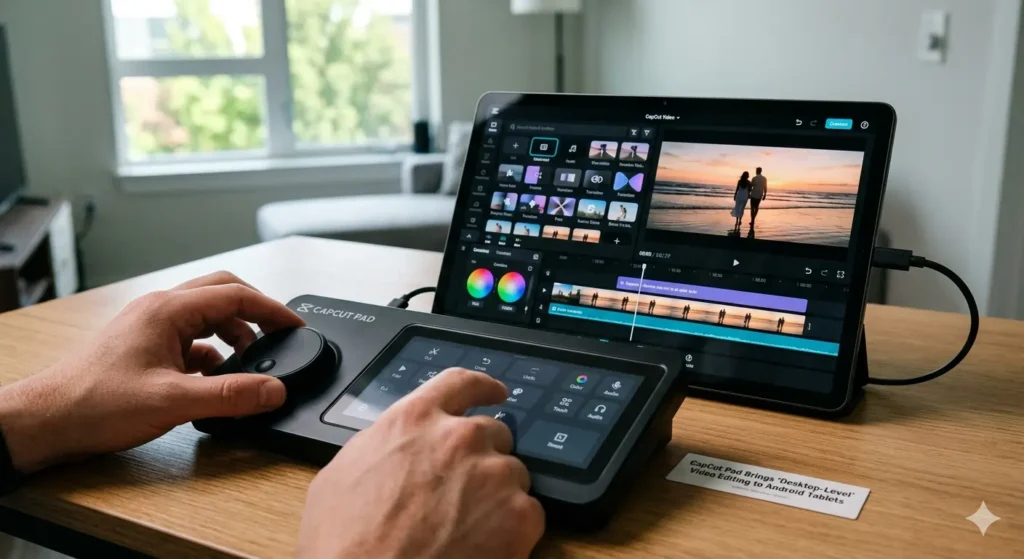
CapCut Pad may completely change how creators edit videos on Android tablets.
Meanwhile, CapCut has long been known as:
- a mobile-first editor
- a TikTok-friendly app
- a beginner-friendly platform
- a fast social video tool
However, CapCut Pad now pushes much further into:
- desktop-style editing
- multitasking workflows
- creator productivity
- advanced video timelines
instead.
Consequently, Android tablets are starting to look much more serious for content creation.
And honestly, this feels like one of the biggest upgrades CapCut has released in years.
What Is CapCut Pad?
Importantly, CapCut Pad is a tablet-focused version of CapCut designed specifically for:
- larger Android screens
- stylus workflows
- multitasking
- advanced editing layouts
Meanwhile, traditional mobile editing apps often feel cramped on phones.
Consequently, CapCut Pad introduces:
- expanded timelines
- desktop-like controls
- drag-and-drop workflows
- larger editing panels
optimized for tablet experiences.
Additionally, the interface reportedly resembles lightweight desktop editing software much more than a simple phone app.
Because of that, creators may finally treat Android tablets as serious editing devices instead of secondary tools.
Why CapCut Pad Feels Different
Initially, most tablet editing apps simply stretched phone interfaces onto larger screens.
However, CapCut Pad reportedly redesigns the workflow around:
- multi-track timelines
- layered editing
- larger previews
- multitasking controls
instead.
Consequently, creators can manage:
- clips
- effects
- transitions
- subtitles
- audio layers
much more efficiently.
Additionally, tablet screen space finally becomes useful instead of wasted.
And honestly, that alone could make editing dramatically faster for many creators.
Android Tablets Are Quietly Becoming Creator Devices
Interestingly, Android tablets increasingly compete against:
- iPads
- lightweight laptops
- creator notebooks
- portable editing systems
instead of functioning only as media devices.
Meanwhile, newer Android tablets now include:
- OLED displays
- desktop-style multitasking
- stylus support
- powerful chipsets
- large batteries
Consequently, companies increasingly market tablets toward:
- creators
- editors
- streamers
- digital artists
instead of casual users alone.
Because of that, apps like CapCut Pad suddenly make much more sense.
CapCut Keeps Expanding Beyond TikTok
Importantly, CapCut is no longer just a simple TikTok editor.
Meanwhile, the platform increasingly offers:
- AI tools
- advanced effects
- motion tracking
- desktop editing
- cloud workflows
across multiple devices.
Consequently, CapCut increasingly competes against:
- Adobe Premiere Rush
- DaVinci Resolve
- VN Editor
- LumaFusion
- Canva video tools
instead of remaining only a casual mobile app.
Additionally, ByteDance continues pushing CapCut deeper into professional creator workflows overall.
Because of that, CapCut Pad may represent a much bigger strategic move than it first appears.
“Desktop-Level” Editing Is Becoming a Buzzword
Meanwhile, many companies now describe tablet apps as:
- desktop-class
- desktop-like
- professional-grade
- creator-focused
to attract power users.
Consequently, expectations around tablet software continue rising rapidly.
Additionally, creators increasingly expect:
- advanced timelines
- keyboard shortcuts
- layered editing
- multitasking workflows
even on mobile devices.
Because of that, lightweight mobile editors increasingly feel outdated compared to modern creator tools.
AI Editing Features Are Expanding Too
Meanwhile, CapCut continues aggressively adding AI-powered features including:
- auto captions
- AI cut tools
- background removal
- voice enhancement
- automatic effects
Consequently, editing workflows increasingly focus on:
- speed
- automation
- creator efficiency
- social content production
instead of traditional manual editing alone.
Additionally, AI-assisted editing may become one of CapCut Pad’s biggest selling points overall.
Because of that, creators can often finish short-form content dramatically faster than before.
Android Tablets Finally Have Better Editing Options
Historically, iPads dominated mobile video editing because of:
- LumaFusion
- Final Cut Pro for iPad
- better tablet optimization
- stronger app ecosystems
Meanwhile, Android tablets often lacked:
- polished editing software
- professional creator tools
- desktop-style workflows
- optimized interfaces
Consequently, Android creators sometimes preferred laptops instead.
However, CapCut Pad may finally help close that gap significantly.
Additionally, Android tablets now feel much more competitive for mobile editing workflows overall.
Social Video Creation Keeps Growing
Importantly, demand for fast editing tools continues exploding because of:
- TikTok
- YouTube Shorts
- Instagram Reels
- creator culture
- mobile content production
Meanwhile, creators increasingly want:
- portable workflows
- quick exports
- lightweight editing
- social-first tools
instead of heavy desktop software for every project.
Consequently, apps like CapCut Pad fit perfectly into modern creator workflows.
Additionally, tablet editing offers a middle ground between:
- smartphones
- laptops
- desktop workstations
overall.
Because of that, portable editing may become much more common over the next few years.
Could Tablets Replace Lightweight Laptops?
Honestly, for many creators, they already are.
Meanwhile, modern tablets increasingly support:
- keyboards
- stylus input
- multitasking
- external storage
- desktop-like interfaces
Consequently, lightweight editing workflows no longer require traditional laptops for many users.
Additionally, apps like CapCut Pad make tablets feel much more capable for:
- video editing
- social content
- graphic design
- creator productivity
overall.
Because of that, tablets increasingly blur the line between:
- mobile devices
- laptops
- creator workstations
in everyday use.
Final Thoughts
CapCut Pad shows how quickly mobile editing software is evolving.
Meanwhile, Android tablets increasingly transform into:
- creator platforms
- editing workstations
- portable studios
- multitasking devices
instead of simple media tablets.
Consequently, creators now expect:
- desktop-style editing
- AI-assisted workflows
- layered timelines
- professional features
even on portable devices.
Additionally, CapCut continues expanding far beyond its original role as a simple TikTok editing app.
And surprisingly, the future of lightweight video editing may involve tablets far more than traditional laptops.